
The Audi RNS-E (Radio Navigation System Evolution) is one of the most capable factory-fitted navigation units ever produced by the Volkswagen Group. Fitted across a wide range of Audi models from 2005 to 2013 — including the A3, A4, A6, TT, and R8 — it remains a benchmark for integrated in-car navigation even by today’s standards.
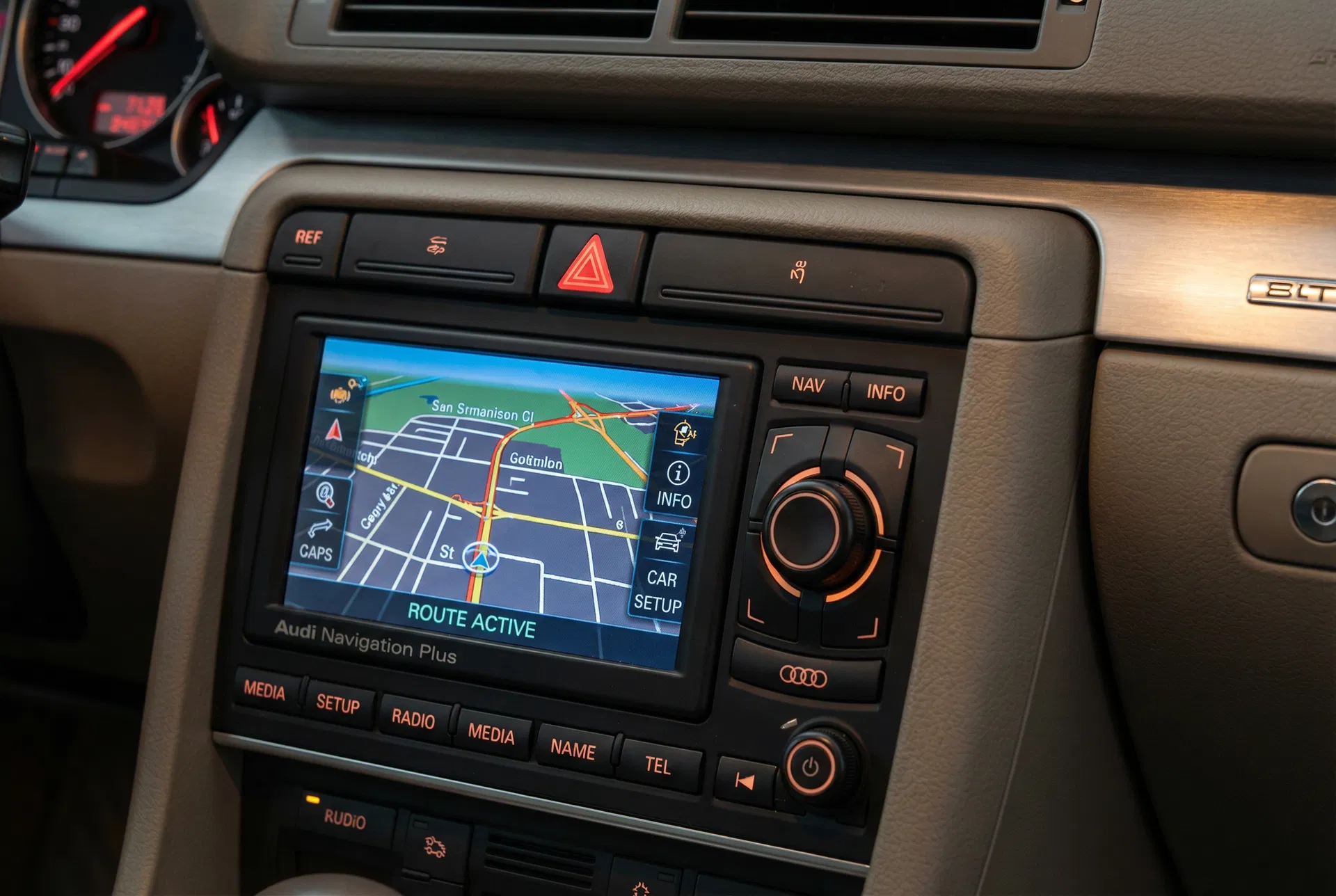
The RNS-E showing an active navigation route — a system that defined a generation of Audi infotainment.
What Makes the RNS-E Special?
Unlike many contemporary systems that relied on external CD changers or separate GPS modules, the RNS-E integrated everything into a single double-DIN unit. It featured a 6.5-inch VGA display — unusually sharp for its era — combined with a DVD-based map drive, a built-in six-disc CD changer, and full TMC (Traffic Message Channel) support. The system also supported Bluetooth telephony through an optional adapter, and later firmware versions added iPod integration.
The navigation software was developed by Audi in partnership with Navteq (now HERE Technologies), and map updates were distributed on DVD. This meant that owners could keep the system current simply by purchasing an updated map disc — a far more straightforward process than the over-the-air updates used in modern vehicles.
Common RNS-E Models and Part Numbers
The RNS-E was produced in several hardware revisions, each identified by a unique part number stamped on the unit’s label:
| Part Number | Fitted To | Key Features |
|---|---|---|
| 8E0 035 192 | Audi A4 B6/B7 | Standard version, no Bluetooth |
| 8P0 035 192 | Audi A3 8P | A3-specific fascia, TMC included |
| 8E0 035 192 E | Audi A4 B7 (later) | Bluetooth-ready, iPod support |
| 8J0 035 192 | Audi TT 8J | TT-specific bezel, full feature set |
Understanding the Anti-Theft Radio Code
Like all Volkswagen Group head units, the RNS-E is protected by a four-digit security code. This code activates whenever the unit loses power — whether due to a flat battery, a battery replacement, or the unit being removed from the vehicle. When the display shows “SAFE” or “CODE”, the system is locked and will not function until the correct code is entered.
The code is unique to each unit and is tied to its serial number. Audi originally provided the code on a small card included in the vehicle’s documentation wallet. If this card has been lost, the code can be retrieved through three legitimate channels:
- Audi Dealership — Present proof of ownership and the dealership can look up the code using the vehicle’s VIN and the unit’s serial number.
- Online Code Services — Specialist services such as VW Codes can retrieve the code from the manufacturer’s database using the serial number found on the unit’s label.
- VCDS / VAG-COM — For technically proficient owners, the code can sometimes be read directly from the unit’s internal memory using diagnostic software.
How to Enter the Radio Code on an RNS-E
Entering the code on the RNS-E is straightforward but requires care, as three incorrect attempts will lock the unit for one hour:
- Switch on the ignition (position II) without starting the engine.
- The RNS-E display will show SAFE or prompt for a code.
- Use the six preset buttons (1–6) to enter each digit of the four-digit code. Button 1 cycles through 0–9 for the first digit, and so on.
- Once all four digits are entered, press and hold the AM/FM button (or the right rotary knob, depending on firmware version) to confirm.
- The system will unlock and resume normal operation.
Firmware Updates and Map Disc Versions
Audi released several firmware updates for the RNS-E over its production life. These updates improved GPS accuracy, added new features, and fixed software bugs. The most significant update was version 0200, which introduced improved Bluetooth stability and enhanced iPod compatibility. Firmware can be updated using a specially prepared DVD burned from files available through Audi’s official channels or verified third-party sources.
Map discs were released annually and covered Europe, North America, and other regions. The final official map release for the RNS-E was in 2016, covering European roads up to that year. Owners wishing to use more current maps must rely on community-maintained updates.
Common Faults and Troubleshooting
Despite its reputation for reliability, the RNS-E does develop certain age-related faults:
- DVD drive failure — The optical drive mechanism can wear out, preventing map disc reading. Replacement drives are available from specialist suppliers.
- Pixel failure on the display — A horizontal or vertical line of dead pixels is a known issue caused by a failing ribbon cable. This can often be repaired by resoldering the connection.
- GPS signal loss — The GPS antenna connection can corrode over time. Cleaning or replacing the antenna connector usually resolves this.
- Bluetooth adapter pairing issues — Older Bluetooth adapters may not pair reliably with modern smartphones. Updating the unit’s firmware often improves compatibility.
Is the RNS-E Still Worth Using?
For owners of Audi vehicles from the mid-2000s to early 2010s, the RNS-E remains an excellent factory option. Its build quality is superior to many aftermarket alternatives, and it integrates seamlessly with the vehicle’s CAN bus — meaning steering wheel controls, reverse camera inputs, and DIS (Driver Information System) all continue to function correctly. For those who prefer a period-correct look and feel, the RNS-E is hard to beat.
If your RNS-E is locked and you need the unlock code, our service can retrieve it quickly using the serial number from the unit’s label. The process takes just minutes and requires no dealership visit.